Directory Listing
How directory listing (indexing) can leak sensitive files and metadata, why it matters, and practical mitigations for web servers and cloud storage.
Description
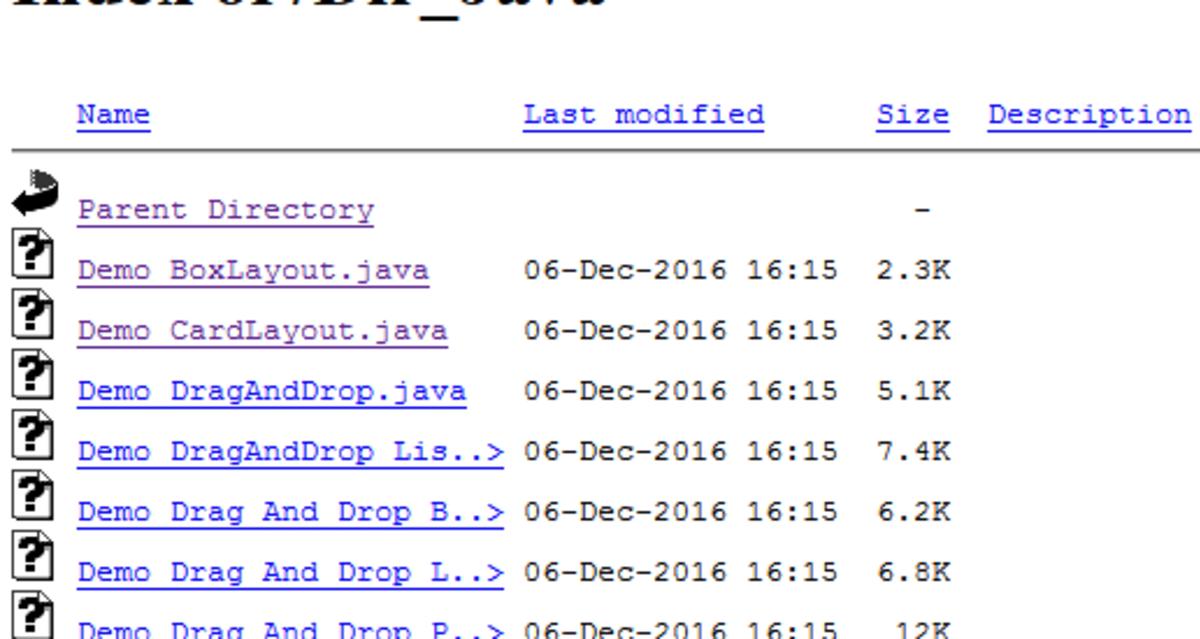
Directory listing (or directory indexing) happens when a web server or storage endpoint generates a page that lists the contents of a directory. It does this when no default index file such as index.html exists, or when indexing is switched on explicitly.
A listing shows file names, sizes, timestamps and direct download links. The files behind it are often configuration backups, archives, logs, credentials or internal documents, and any of those can shortcut the rest of the test.
Where it turns up
Hardening checklists miss this often. Static sites, legacy applications, misconfigured S3 or GCS buckets and staging environments are the usual places.
Impact
- File names, metadata and the directory tree point you at sensitive resources.
- You can map the application internals and pick high-value targets without brute-forcing.
- Exposed credentials, logs or data exports can lead straight to compromise.
- Artifacts in the listing can reveal endpoints, credentials or code paths that feed other bugs such as SQL injection, SSRF or RCE.
Even when no single file is sensitive, the layout alone speeds up targeted attacks.
Common examples
backup/,db_backups/,archives/with SQL dumps or ZIP files.git/directories leaking full source repositories.envorconfigs/with credentials and API keyslogs/with debug traces or internal identifiers- Upload folders containing scripts or executables
- Public cloud storage buckets (S3, GCS, Azure Blob) with object listing enabled
Detection
Request directory paths directly and look at the response. An auto-generated HTML file listing means indexing is on.
Crawlers and tools like dirb, ffuf or Burp Suite also flag directories that return 200 OK with a file listing.
Remediation
In rough priority order:
- Turn off directory indexing:
- Apache:
Options -Indexesin a<Directory>block or.htaccess. - Nginx:
autoindex off;in the relevantlocationorserverblock.
- Apache:
- Put a default index file (
index.html,index.php) in every public directory. - Require authentication for sensitive directories and storage endpoints, with least-privilege access.
- Move backups and config files out of the web root.
- Lock down cloud storage:
- Disable public object listing.
- Apply least-privilege ACLs and bucket policies.
- Hand out pre-signed URLs instead of public objects.
- Set file permissions so only the web server user and admins can read sensitive files.
- Allow only expected file types, or deny dangerous extensions explicitly.
- Alert on unexpected
200responses for directory paths and on public object listings.
Example configurations
- Apache
<Directory /var/www/html> Options -Indexes AllowOverride None </Directory> - Nginx
server { listen 80; server_name example.com; location / { root /usr/share/nginx/html; index index.html index.htm; autoindex off; } } - S3
- Enable Block Public Access.
- Deny
ListBucketto unauthenticated principals in the bucket policy. - Use pre-signed URLs instead of public objects.
Verification
After the fix, request the directory URL. You should get a redirect to an index file, a 403 or 404, or a login page. Re-run the check on a schedule, since deployments and rebuilds can turn indexing back on.
References
MITRE ATT&CK techniques
- T1083 - File and Directory Discovery - Directory structure enumeration
- T1046 - Network Service Discovery - Service reconnaissance
- T1592 - Gather Victim Host Information - Infrastructure reconnaissance
- T1213 - Data from Information Repositories - Exposed file access
CWE entries
- CWE-548 - Exposure of Information Through Directory Listing - Specific weakness
- CWE-200 - Exposure of Sensitive Information - Parent category
Security resources
- OWASP: Error Handling & Information Leakage - Guidance on error handling
Next steps
If you find a directory listing during a test, go through every exposed file for secrets and data, then check for related issues:
- Verbose error messages
- Metadata service exposure
Disabling indexing is a one-line fix, so it belongs in the standard server build and the deployment pipeline checks.
Cross-Site Request Forgery (CSRF): Exploitation and Defense
How CSRF works, how to get past weak token and SameSite defenses, proof-of-concept payloads, and what actually stops it.
Host Header Poisoning
How applications that trust the HTTP Host header end up with poisoned password reset links, poisoned caches, SSRF and access control bypasses.